There is no single AI video generation cost per minute. In the verified examples below, one raw generated minute allocates about $3 on Runway’s Gen-4 Turbo API, $4.40 for the listed Wan 3.0 configuration on Pika Starter, or $24 for Veo 3.1 with audio through Runway’s API. Those figures assume the specified settings and exclude rejected takes, editing, separate assets, and tax. They are usage calculations—not the amounts a new customer necessarily pays at checkout.
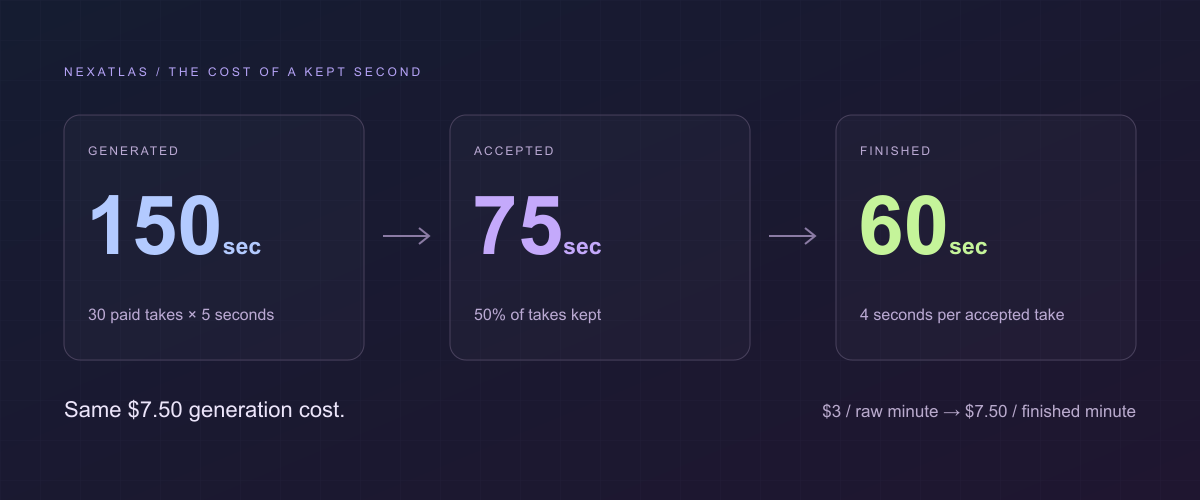
A worked example makes the distinction useful: generating 150 seconds at $0.05 per second costs $7.50 in credits. If only 60 seconds survive selection and trimming, the footage cost is $7.50 per finished minute, even though the model’s raw-output rate is $3 per minute. A new Runway developer account must initially buy at least $10 of credit.
This guide uses public documentation checked on November 2, 2026. It is an independent pricing analysis, not a quality benchmark or a report of our own production results. Retry rates, labor hours, and editing yields below are explicitly chosen scenarios.
Define the minute before comparing prices
A generated minute is 60 seconds returned by a model, often assembled from many short jobs. It can include unusable hands, an incorrect product, or a character whose appearance changes. The API can complete successfully while the creative result fails your brief.
An accepted minute includes only approved takes, before trims. A finished minute includes what remains on the delivery timeline. You might accept a five-second take but keep four seconds, or combine moving footage with stills and typography. An avatar presenter minute is also a different deliverable from a minute of cinematic generated scenes.
Choose the denominator that matches the question. Use raw minutes to compare rate cards, accepted shots to manage generation, and final minutes to price a finished project. Keep voice, music, reference images, editing, and human time on separate lines until the final total.
Why a Finished Minute Costs More
The generation bill stays at $7.50 while fewer seconds reach the final timeline.
- 01Raw generated footage150 sec
30 paid takes × 5 seconds. The entire output is billed.
- 02Selected takes75 sec
15 takes accepted: 50% of the generated material.
- 03Final edited output60 sec
Keep 4 of each accepted take’s 5 seconds: 80% retention.
Method note. Example scenario, not a hands-on benchmark. Gen-4 Turbo API: 150 sec × $0.05 = $7.50. This is $3 per raw minute and $7.50 per finished minute. The bars share a 150-second starting scale; 50% × 80% = 40% final yield.
Based on Runway API pricing and the article formulas, checked . Pricing can change.
Four formulas you can reuse
Let P be the plan price, Q the included credits, U the credits consumed, G generated seconds, and D finished seconds.
Full-utilization credit rate = P / Q
Allocated generation cost = U × (P / Q)
Cost per raw generated minute = allocated generation cost / (G / 60)
Cost per finished minute = allocated generation cost / (D / 60)
The first rate assumes you use the entire allowance productively during its valid period. If you buy a $10 plan and use only 400 of its 900 credits before the rest expire, the cash expense is $10, not $4.44. Its realized cash rate is $10 ÷ 400 = $0.025 per consumed credit. If that project is the only use, allocate the whole $10 to it when measuring cash cost.
For pay-as-you-go credits with a published fixed dollar price, multiply consumption by that price. Separately track purchases, unused balance, and taxes. A $10 top-up with $3 used means $3 consumed and $7 still in the wallet; the bank transaction was $10.
For a whole production:
Production cost = footage + reference assets + audio + post-production
                  + human hours × hourly rate + other project expenses
Do not add both an entire subscription and the allocated credits from that same subscription. Choose cash accounting or usage allocation, label it, and reconcile the unused allowance.
Estimated Cost Per Usable Minute
Four API configurations, using the same illustrative 40% usable-footage yield.
- Gen-4 Turbo · Runway APIRaw rate: $3.00 / min$7.50/ usable min
- Gen-4.5 · Runway APIRaw rate: $7.20 / min$18.00/ usable min
- Veo 3.1 · Runway API · no audioRaw rate: $12.00 / min$30.00/ usable min
- Veo 3.1 · Runway API · with audioRaw rate: $24.00 / min$60.00/ usable min
Method note. Illustrative yield: 50% accepted × 80% retained = 40%. Cost = raw-minute rate ÷ 0.4, before whole-job rounding, tax, assets, and post-production. Not a measured quality benchmark or checkout price; initial API funding is at least $10.
Based on Runway API pricing and the article formulas, checked . Pricing can change.
Verified prices: model, platform, and payment
The rows are distinct purchase routes, not interchangeable currencies. Dollar figures are rounded only for display. The Pika rows assume full use of its monthly allowance; Runway API rows use its published fixed credit price.
| Route and configuration | Billing rule | Theoretical raw minute | Entry payment / capacity condition |
|---|---|---|---|
| Runway API, Gen-4 Turbo | 5 credits/second × $0.01 | $3.00 | At least $10 initial credit purchase; separate from web plans |
| Runway API, Gen-4.5 | 12 credits/second × $0.01 | $7.20 | At least $10 initial purchase |
| Runway web Standard monthly, Gen-4.5 | 720 credits × ($15 ÷ 625) | $17.28 allocated | $15 entry; 625 credits cannot cover 720 credits of video |
| Pika Create Starter, Wan 3.0, 720p, 5 seconds | 12 clips × 33 credits × ($10 ÷ 900) | $4.40 allocated | $10 monthly; images and other actions share the 900 credits |
| Pika Create Starter, Seedance 2.5, 720p, 5 seconds | 12 × 122 × ($10 ÷ 900) | $16.27 allocated | $10 entry; the required 1,464 credits exceed the allowance |
| Runway API, Veo 3.1 with audio | 40 credits/second × $0.01 | $24.00 | API wallet must cover the job; $10 entry is insufficient for this minute |
| Runway API, Veo 3.1 without audio | 20 credits/second × $0.01 | $12.00 | Separate audio work may still be necessary |
Sources: Runway developer rates, developer minimum purchase, Runway web plans, and Pika Create plans and model table. A theoretical minute here is a normalized sum of clip durations; it does not promise one uninterrupted 60-second generation.
Pika’s table does not enumerate every audio/reference combination. Verify the quote for the exact 33-credit configuration before relying on it; the Wan app defaults to the more expensive Prime variant. Treat a changed quote as a changed calculation, not a small detail to ignore.
A subscription price is not a per-credit price
Runway Standard’s $12-per-month annual equivalent means a $144 annual commitment, not a $12 one-month checkout. Its billing help article distinguishes that from $15 monthly.
For the Gen-4.5 web example, 60 × 12 = 720 credits. A new $15 Standard month includes only 625. Runway permits paid subscribers to buy at least 1,000 extra credits; its purchased-credit rules list $0.01 each. Adding that $10 purchase makes the cash outlay $25 before tax, with unused capacity left over. The $17.28 number is an allocation at the subscription’s full-utilization rate; it is not an available $17.28 checkout.
Pika has a similar cliff: the listed smallest top-up is $25 for 1,500 credits. A Starter subscriber whose minute needs 1,464 credits would spend $10 + $25 = $35 before tax if choosing that top-up route. Its $35 Creator month is another possible purchase, with a different allowance. Recalculate rather than carrying Starter’s credit rate into the new plan.
Text, images, resolution, and duration change the bill
Text-to-video starts from a description. Image-to-video adds a prepared visual starting point, which may reduce creative drift but can require several paid stills first. It is not automatically cheaper per generated second. Check both the video quote and the cost of producing its references.
Longer requests are not always linear. Luma’s current Ray 3.2 API table lists 100 credits for five seconds of 720p standard-dynamic-range generation and 300 for ten seconds. Twelve five-second jobs therefore require 1,200 credits for a theoretical minute, while six ten-second jobs require 1,800. At 1080p, a five-second standard job lists 400 credits; 720p HDR lists 200.
Luma says the dollar value of a credit depends on the account’s plan or contract. We therefore leave the conversion as credits × your verified account rate, instead of inventing a universal dollar price. The documented pay-as-you-go option has no minimum spend; that is distinct from reserved-capacity contracts. An edit or reframe job has its own table, so do not price it using a text/image-generation row.
Native sound is another variable. The two Veo rows above show the cost difference on one specified reseller route, not a universal Google price. They do not establish that the two output modes will be equally useful for your project.
Check whether the documented service still exists
Google’s Veo guide now states that its Gemini API Veo 3.1 preview models shut down on October 22, 2026. It directs users toward other supported routes, including GA models on Google’s Agent Platform. The former preview rate is not a buying recommendation today.
Runway’s current pricing summary also implies a different Gen-4 Turbo web allowance from its older Gen-4 help page. Our fixed $3/minute Turbo calculation is specifically the documented API rate; we do not transfer it to the web subscription. Platform, version, and access status belong beside every price.
Retries and trimming multiply the cost
Use a for the accepted-take fraction and t for the fraction of each accepted take kept in the edit. If all final footage is generated motion:
Usable yield = a × t
Required generated seconds ≈ final seconds / (a × t)
Footage cost per finished minute ≈ raw-minute rate / (a × t)
Suppose you accept one of every two five-second takes (a = 0.5), then keep four seconds from each (t = 0.8). Yield is 40%, not 50%. A $3 raw-minute rate becomes $3 ÷ 0.4 = $7.50 per finished minute. “Two attempts” means the original plus one retry; two retries means three attempts.
| Accepted takes | Kept portion of accepted takes | Usable yield | Finished-minute footage cost at $3/raw minute |
|---|---|---|---|
| 100% | 100% | 100% | $3.00 |
| 50% | 100% | 50% | $6.00 |
| 50% | 80% | 40% | $7.50 |
| 25% | 80% | 20% | $15.00 |
These are sensitivity scenarios, not industry-average success rates. Performance depends on the exact action, consistency requirements, and acceptance standard. Technical billing failures and successfully rendered but unwanted footage also have different refund rules; check the provider rather than assuming either is free.
The Price of Another Take
Hold trimming constant. Increase only the paid attempts needed for each accepted shot.
- 1 paid take per accepted shotLow retry scenario · 0 retries · 100% acceptance$3.75/ usable min
- 2 paid takes per accepted shotMedium retry scenario · 1 retry · 50% acceptance$7.50/ usable min
- 4 paid takes per accepted shotHigh retry scenario · 3 retries · 25% acceptance$15.00/ usable min
Method note. Explanatory scenario, not a measured benchmark. Keep 80% of every accepted take, at $3 per raw minute. Estimated cost = $3 × attempts ÷ 0.8. One finished minute needs 15 accepted five-second shots trimmed to four seconds each. Figures cover footage consumption, not the minimum payment.
Based on Runway API pricing and the article formulas, checked . Pricing can change.
Worked budgets for 30 seconds, 60 seconds, and 3 minutes
Use Gen-4 Turbo API at $0.05/second, five-second requests, two attempts per required shot, and four useful seconds from the accepted take. The shot count is rounded up: ceil(final seconds ÷ 4). These are footage-only examples with no stills, voice, music, or labor included.
| Delivery target | Accepted shots needed | Paid attempts | Generated seconds | Credits used | Allocated footage cost |
|---|---|---|---|---|---|
| 30 seconds | 8 | 16 | 80 | 400 | $4.00 |
| 60 seconds | 15 | 30 | 150 | 750 | $7.50 |
| 180 seconds | 45 | 90 | 450 | 2,250 | $22.50 |
Different Lengths, Different Credit Bills
Generation consumption for three finished-video targets. Bars use one shared dollar scale.
- 30-second clip$4.00
Footage credits consumed
- 16 paid attempts · 8 accepted shots
- 80 generated sec · 400 credits
- $8.00 per final minute
- 60-second clip$7.50
Footage credits consumed
- 30 paid attempts · 15 accepted shots
- 150 generated sec · 750 credits
- $7.50 per final minute
- 3-minute short$22.50
Footage credits consumed
- 90 paid attempts · 45 accepted shots
- 450 generated sec · 2250 credits
- $7.50 per final minute
Method note. Article scenario: Gen-4 Turbo API at $0.05/sec, two attempts per kept shot, four useful seconds per five-second take. Round shots up: ceil(final seconds ÷ 4). The 30-second edit trims 32 accepted seconds to 30. New-wallet funding is at least $10; audio, images, labor, and tax are extra.
Based on Runway API pricing and the article formulas, checked . Pricing can change.
Eight four-second shots supply 32 accepted seconds; two are trimmed away to deliver the first row’s 30 seconds. Its realized footage rate is therefore $4 ÷ 0.5 = $8 per finished minute. The other rows land exactly on the planned duration and cost $7.50 per finished minute.
A new developer wallet still requires at least $10 initially for either of the first two scenarios. The third needs at least $22.50 of funded capacity; confirm available purchase amounts at checkout and count any unused balance separately. An existing funded account has a different cash transaction today, but its credits are not free.
For a lower-risk mixed-motion project, our short-film budget guide combines 32 seconds of moving footage with eight seconds of still holds and five seconds of titles. That smaller motion requirement is why its one-month plan can retain a repair allowance.
What a client-ready minute adds
An illustrative one-minute production might consume $7.50 in video credits, $2 in separately metered reference images, $6 for an optional voice subscription used only on that job, and three hours of labor valued at $25/hour. The total is $90.50 before tax. The $2 and labor inputs are assumptions, not vendor quotes. If you already had a voice plan serving several jobs, allocate it consistently instead of charging the full bill to every project.
Add actual music rights, revisions, captions, compositing, delivery versions, and quality control as needed. A video editor may be free while editing is time-consuming. DaVinci Resolve’s free edition avoids an editor subscription, but neither it nor an AI generator supplies your judgment at no cost.
Self-hosting shifts the cost to hardware, compute rental, electricity, storage, and setup. Our Genmo Mochi guide describes an open-weight route, not free production. For narrated whiteboard explainers, Ankon AI addresses a different output category; compare the brief before comparing prices.
Choose a spending rule before choosing a plan
For a budget below $30, pick one platform and avoid buying a second subscription for a single difficult shot. Price a small storyboard, reserve retries, and verify the whole checkout. A $25 top-up can be the wrong rescue for a $30 project even when its individual credits look inexpensive.
For recurring social content, track credits bought, credits used, generated seconds, approved shots, and final seconds for several real projects. Subscribe only when the allowance you can use beats the alternative metered route. For commercial work, add a revision limit and a contingency based on your own observed yield; do not promise a client the lowest theoretical row in a comparison table.
Lock the model and settings, approve inexpensive references first, and generate the hardest necessary shot early. Change one prompt variable at a time. Download approved assets and record renewal and expiry dates. Runway’s credit guide separates web and API balances; Pika’s FAQ says monthly credits reset and purchased packs expire after 365 days. Unused capacity can erase an apparent discount.
Frequently asked questions
Is the cheapest rate the best tool?
Not necessarily. A model costing twice as much per second can be cheaper for your final edit if its acceptance rate is more than twice as high for your specific shot. That is a workflow measurement you must collect; this price table does not prove it.
Does one minute mean one generation?
Usually not for these configurations. Normalize multiple short clips to compare rates, then respect the model’s actual duration choices. Use whole-job rounding when forecasting a film, and remember that continuity across cuts is an editing problem as well as a generation problem.
Are free credits enough for commercial work?
Check the specific plan and license. Pika’s current Free plan has no recurring allowance and does not include commercial use, even with a purchased credit pack. A free trial is not a repeatable monthly production budget.
What number should go in my budget?
Record both the required cash purchase and the expected footage consumption, then divide all project costs by final delivery minutes. If you cannot estimate retries yet, show several yield scenarios and impose a spending cap. A transparent range is more useful than a precise number based on an unstated assumption.
Sources and calculation basis
Checked November 2, 2026. All arithmetic and scenarios are original. No tool quality, latency, or success-rate tests were performed. Rates can change; the authenticated generation quote and checkout govern the actual transaction.
- Runway API pricing and setup/minimum payment.
- Runway web pricing, annual versus monthly billing, and credit rules.
- Older Gen-4 web documentation: a documented inconsistency, not our current web-budget assumption.
- Pika Create pricing, FAQ and billing conditions, and Wan 3.0 settings.
- Luma Agents pricing: credits by request type, duration, resolution, and dynamic range; account-dependent dollar conversion.
- Google Veo access notice and current GA model documentation.
- DaVinci Resolve: free editing software, distinct from production labor.