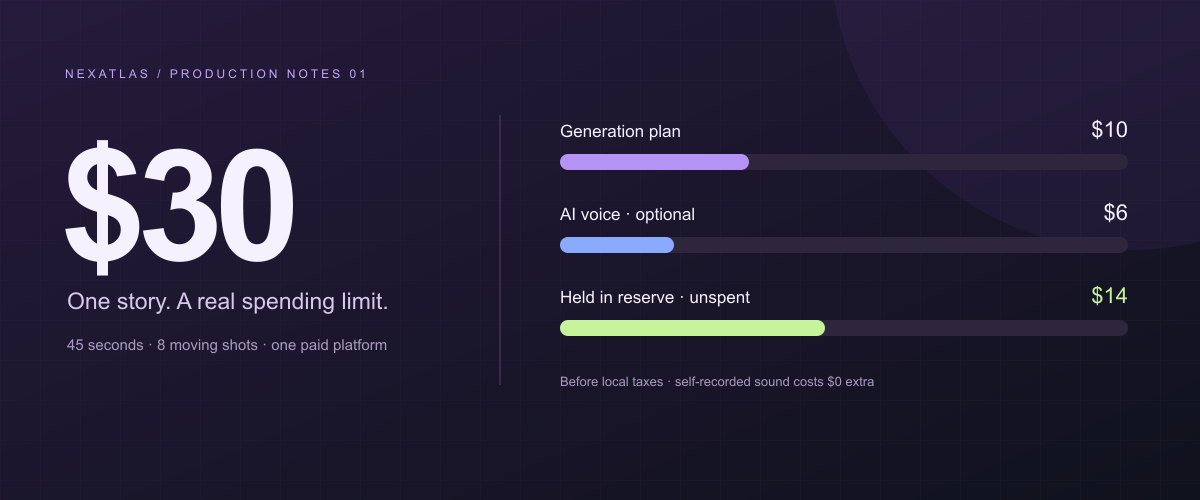
Yes: a $30 ceiling can cover a complete, deliberately small AI short film. The plan below targets a 45-second story with eight moving shots, a few still-image holds, and your own sound. Its required software payment is $10 before tax, rather than $30 of imaginary fractions of several subscriptions. An optional AI voice raises the planned payment to $16 before tax.
This is a production plan calculated from public prices checked on November 2, 2026. We did not generate or test this film. The allowance can pay for the attempts described; it cannot guarantee eight successful shots, a consistent character, or a professional finish. You supply an existing computer, internet connection, editing time, and creative decisions.
What a $30 film can realistically be
Think of a micro-story with a beginning, a decision, and an ending. One subject, one location, a restrained visual style, and narration or sound effects are manageable constraints. A continuous three-minute action scene with multiple talking actors is a different project.
The route is AI stills → short image-to-video shots → a conventional edit. Stills let you decide composition before paying for movement. Some story moments can remain stills with a slow digital push: a held image of a missing object can be more useful than an expensive shot that moves without advancing the story.
Our example, The Last Light, follows a small maintenance robot in a dark greenhouse. Its lamp is fading. It discovers one surviving seedling, moves its lamp toward it, and chooses to stay. This is an original illustrative brief, not a film we claim to have made. The final moment should reveal the decision visually; captions support it rather than explain everything.
The actual $30 budget
Use Pika Create Starter, billed monthly, as the single paid generation platform. Its official pricing page lists $10 for 900 monthly credits, watermark-free downloads, and commercial use on the paid plan. The same page lists Wan 3.0 at 33 credits for a five-second 720p generation and Nano Banana 2 at eight credits per 1K image.
| Item | Actual planned payment | What it covers |
|---|---|---|
| Pika Create Starter, one month | $10 | A shared 900-credit allowance for images and video |
| Script and shot list | $0 | Write locally; no paid writing assistant required |
| Editing and export | $0 | Free DaVinci Resolve, using free features only |
| Voice and sound, baseline | $0 | Record your own voice and ambience, or make a nonverbal film |
| Optional ElevenLabs Starter | $6 | Full monthly charge for AI narration; not needed for the baseline |
| Unspent contingency | $14 | Taxes, currency charges, or an explicitly reconsidered purchase |
| Maximum allocated | $30 | $16 in planned subscriptions with optional voice; $14 unspent |
Without the optional voice subscription, keep $20 unspent. A budget ceiling is permission to spend up to an amount, not a reason to spend it all. Taxes and exchange fees vary: if the actual checkout total would break $30, omit the optional service or stop before paying. This excludes new hardware and the value of your time.
ElevenLabs’ pricing FAQ lists Starter at $6 monthly with a commercial license. An annual equivalent or an expired promotional banner is not our purchase assumption. Blackmagic’s product page confirms a free Resolve edition; the paid Studio edition is unnecessary here.
Example $30 Budget Allocation
A spending ceiling, with the reserve still in your pocket.
- AI generation planOne Pika month; video and images share the credits.$10
- Optional AI voiceoverFull ElevenLabs monthly charge if you choose it.$6
- Buffer / reserveUnspent cash. Not an extra pack of video credits.$14
Method note. Example budget, not fixed spending: $10 required before tax, or $16 with optional voice. The planned retries are already inside the generation allowance. A $25 Pika top-up would exceed this $30 ceiling.
Based on the article’s official pricing sources, checked . Pricing can change.
Credits consumed are not the checkout price
| Generation allowance | Calculation | Credits |
|---|---|---|
| Still-image attempts | 12 × 8 | 96 |
| First video takes | 8 × 33 | 264 |
| One replacement take per shot | 8 × 33 | 264 |
| Planned consumption | 96 + 264 + 264 | 624 |
| Remaining allowance | 900 − 624 | 276 |
At full monthly utilization, a credit allocates $10 ÷ 900 = $0.011111… of the subscription. One listed clip allocates about $0.367; 624 credits allocate about $6.93. You still pay $10, even if those are the only credits you use. Sixteen five-second attempts provide 80 seconds of raw output; eight accepted takes trimmed to four seconds provide 32 moving seconds.
These are planning assumptions, not an observed 50% acceptance rate. The remaining 276 credits could fund eight more 33-credit attempts, leaving 12 credits, if image spending stays fixed. They are not unlimited retries.
Check the settings before subscribing or generating
Open the Wan 3.0 app documentation and confirm the standard model, Frames mode, five-second duration, and 720p output are available to your account. Frames starts from an image. The documentation warns that Wan 3.0 Prime is the default and costs more. Change it to standard Wan 3.0; do not accidentally budget the standard price while generating with Prime.
The pricing table does not spell out every combination of references and audio. Treat 33 credits as the expected listed rate and a stop limit, not a promise that every configuration costs 33. Use a still reference, avoid input video, and check the generation quote. If the quote is higher, simplify the settings and recalculate before spending. If the listed configuration is unavailable, the route is conditional and should not be purchased on this article alone.
Pika’s FAQ also distinguishes Create from its separately billed API and legacy product. Buy the named web plan, not API credits. Monthly credits do not roll over; subscriptions renew unless cancelled. A free account currently has no recurring credit allowance, and buying a pack on Free does not add commercial use. None of our arithmetic depends on trial credits.
Write the story before buying movement
A script with a visible turning point
Write three sentences: the robot needs light; it finds something that needs light more; it stays beside the seedling. Turn those into a 45-second edit before adding dialogue. An example voiceover is: “The greenhouse had gone quiet. One light remained. It could save the way home—or something that had never seen the sun.” Write your own ending rather than asking a generator to invent the plot mid-production.
Read any narration aloud against a stopwatch. Leave room for the decision and final image. If the words need constant fast delivery, shorten them. This also makes optional text-to-speech cheaper to revise: lock the text before synthesizing several performances.
Where the Budget Goes
Approve the inexpensive work before committing to moving footage.
- 01Script / planning$0
Write the story and build a timed animatic with existing tools.
- 02Video generation$10
One monthly plan funds the stills, first takes, and planned retries.
- 03Voiceover$6 optional
Record your own voice for $0 extra, or buy the full voice month.
- 04Editing / reserve$14 held
Free editor, $0 extra editing software. Keep the remaining cash unspent.
Method note. Based on the article scenario and existing hardware. Labor is excluded. The $14 reserve is not a payment; local tax and currency fees reduce it. Optional voice uses the $6 price documented in the article.
Based on the article’s official pricing sources, checked . Pricing can change.
Build a timeline you can afford
| Segment | Picture | Final duration |
|---|---|---|
| Opening | Title on a greenhouse still | 2 seconds |
| Shots 1–2 | Greenhouse wide; robot’s dim lamp | 8 seconds |
| Still hold A | Empty charging socket, slow digital push | 4 seconds |
| Shots 3–4 | Robot pauses; seedling revealed | 8 seconds |
| Still hold B | Seedling close-up | 4 seconds |
| Shots 5–6 | Lamp turns; light reaches the plant | 8 seconds |
| Shots 7–8 | Robot settles; final wide composition | 8 seconds |
| End card | Title and tool credits | 3 seconds |
| Total | 32 moving + 8 still + 5 titles/credits | 45 seconds |
The holds reuse your approved images; they do not require extra video generations. Keep this distinction visible when explaining the film to others. It is a finished mixed-motion short, not 45 seconds of continuous newly generated motion.
What This Small Budget Is Designed to Make
A 45-second mixed-motion micro-film, with a bounded allowance for another take.
- Final edit target45 sec
A complete small story
- 32 sec of moving footage
- 8 sec of still holds
- 5 sec of titles / credits
- Accepted-shot target8 shots
Four useful seconds per shot
- 16 paid five-second attempts planned
- One replacement take per shot
- Acceptance is an assumption
- Credit headroom276
Credits left after the plan
- 624 of 900 credits allocated
- Includes 12 image attempts
- Up to 8 more takes at 33 credits
Method note. Based on the article scenario, not a hands-on benchmark. 12 × 8 image credits + 16 × 33 video credits = 624. Eight further 33-credit attempts use 264 of the remaining 276. Results are not guaranteed; check the exact standard-model quote.
Based on the article’s official pricing sources, checked . Pricing can change.
Create references and keep the robot recognizable
Set aside the twelve image attempts as a finite pool: eight planned shot keyframes plus four alternatives or repairs. That may be insufficient for an elaborate character. Choose a simple design, and simplify again if the stills do not agree.
Make a reference sheet with five fixed traits: rounded brass body, one circular lamp, two short feet, green fabric strap, and a small dent on the left side. Keep a neutral reference, a greenhouse wide, and the seedling detail in a project folder. Compare each new image against the same approved reference, not the last flawed generation.
Try an image brief such as: “A small brass maintenance robot with one circular lamp and a green strap, standing beside an empty charging socket in an abandoned greenhouse. Muted teal shadows, warm light, simple stop-motion-like forms, medium shot.” The reference image carries appearance; the text specifies composition. Pika documents reference-based character workflows, but explicitly notes that consistency can vary. There is no identity lock guaranteed by repeating a prompt or seed.
Inspect silhouettes, lamp shape, strap position, and screen direction before animating. A beautiful image with an extra arm is not a good first frame. Keep tiny text, complex hands, and interactions between several subjects outside the brief.
Animate one action at a time
Upload an approved keyframe in Frames mode. Lock duration, aspect ratio, model, and credit quote. Use a movement prompt with one action and one camera instruction: “The robot slowly turns its lamp toward the seedling. Locked camera, gentle movement, the greenhouse remains still.” A moving camera, a walking robot, falling glass, and a changing time of day should not all share one cheap shot.
For each result, judge four things: does the story action read; does the robot remain recognizable; are at least four continuous seconds usable; and will it cut beside its neighboring shot? Rejecting a technically complete render is a creative cost. Do not assume that an unsatisfying result will be refunded. Technical missing-output problems should follow the provider’s support process.
Keep a tiny ledger: shot ID, reference filename, settings, quoted credits, credits actually charged, verdict, and useful timecode. Generate one version of all eight shots before spending every replacement take on the opening. If a movement repeatedly fails, replace it with an insert or a held image. A constrained edit is usually a better rescue than another unplanned subscription.
Add voice, music, and an intentional edit
Record narration in a quiet room with an existing microphone or phone, then trim breaths and adjust levels in your editor. For AI narration, buy the optional monthly plan only after the script and required voice rights are clear. Do not treat a free voice tier as automatically licensed for a monetized film. Avoid imitating a recognizable person’s voice without permission.
The baseline uses self-recorded ambience, simple original sound effects, and no paid music. A hum, a switch click, and silence can tell this particular story. If you add a music library or AI score, check the intended use and account for the complete required payment. “Royalty-free” alone does not establish that a track is free to obtain or use anywhere.
In Resolve, start a project at the footage’s actual frame rate. Put the strongest four seconds from each accepted take on the timeline, then add the holds and titles. Match exposure and color rather than buying an upscale to hide mismatches. Mix narration so it stays intelligible on phone speakers. Captions and sound effects should clarify action, not disguise an incoherent sequence.
Export an H.264 MP4 at the source dimensions for the first review. An upscale changes delivery dimensions, not the detail originally generated. For Shorts, plan a vertical composition from the start; a later crop can remove the seedling that makes the ending intelligible. Watch the exported file from beginning to end before sharing it.
Where this budget breaks—and how to stop
| Failure | Cost consequence | Cheaper response |
|---|---|---|
| Every shot needs several new faces | Image allowance disappears | Simplify the subject; use fewer close-ups |
| Prime, higher resolution, or a different model is selected | The 33-credit assumption fails | Read the quote; return to the priced configuration |
| An action needs repeated repairs | Paid takes do not become useful seconds | Cut to an insert, still, or simpler action |
| A second platform is added “just for one shot” | Another full payment is due | Re-edit within the existing allowance |
| The project crosses renewal day | A second monthly bill arrives | Track the renewal date and cancel if finished |
Stop when the remaining allowance cannot pay for the unfinished shot list at the new quote. Shorten the film before buying more. Pika’s smallest displayed top-up is $25; adding it to a $10 plan already exceeds this $30 ceiling before tax. The remaining cash reserve is not a hidden entitlement to buy that pack.
For a fuller model of attempts, trimming, and paid capacity, use our AI video generation cost per minute guide. An open-weight model such as Genmo Mochi is another route if you already have suitable hardware, but GPU time and setup are not free. Ankon AI serves a different whiteboard-explainer brief; it is not a substitute for this narrative workflow.
Frequently asked questions
Can I make a 60-second film with the same plan?
Possibly, with a different edit. Twelve accepted four-second shots plus twelve seconds of stills and titles make a minute. At two attempts per shot, 24 × 33 + 12 × 8 = 888 credits, leaving only 12. That fits the listed allowance but leaves almost no repair capacity. Start with the 45-second version instead of promising the longer one.
Is this a $10 film or a $30 film?
It is a film planned under a $30 cash ceiling. The required subscription is $10 before local charges; with optional AI voice it is $16. The unspent reserve is not an expense. Labor and existing equipment are excluded, so this is not a client production quote.
Does paid access guarantee commercial clearance?
No. The plan includes commercial use according to the provider, subject to its terms and the selected model. You still need appropriate rights to uploaded images, performances, voices, and music. Festival and platform disclosure requirements may also apply.
What should I do first?
Make the 45-second animatic with placeholder images and your own audio. If the story works, check the current monthly checkout and generation quotes, then buy one plan. Finishing a small, clear story is a better first objective than exhausting every available credit.
Sources and verification notes
All prices were checked on November 2, 2026; no paid tool generation was performed for this article. Budget arithmetic is our own. Recheck the named plan, model, and settings before purchasing.
- Pika Create pricing: monthly allowance, listed generation rates, commercial plan, and top-up size.
- Pika Help Center: references, separate API billing, renewal, expiry, refunds, and commercial-use conditions.
- Wan 3.0 on Pika: Frames mode, durations, ratios, and the more expensive default Prime variant.
- ElevenLabs pricing: optional Starter monthly payment; the FAQ lists $6 rather than a promotional or annual equivalent.
- DaVinci Resolve: free editing edition and its capabilities.